Create your own Playlist on LessonPaths!
Showing posts with label technology. Show all posts
Showing posts with label technology. Show all posts
Wednesday, April 9, 2014
Dinosaurs!
We are currently working on creating a question and answer book about dinosaurs through guided research. Today we will try to find answers to the questions we have collected from our reading. We will be using some really fun iPad apps as well as these websites here!
Thursday, May 30, 2013
Science Party
Yesterday we had a Space Party and did lots of fun Space activities. We all got in a spacesuit that our teacher made out of a cardboard box. We thought it was exciting! There were five other stations too. Our favorite station was making Atomic Slime Goo that glows in the dark! We made the slime glow by using a black light. We lit up too! One of our other favorite stations was making Moon Sand and playing with it. We made moon sand castles and it was very, very fun and interesting. We hope you enjoy our video!
Wednesday, April 3, 2013
Geometry and Space!
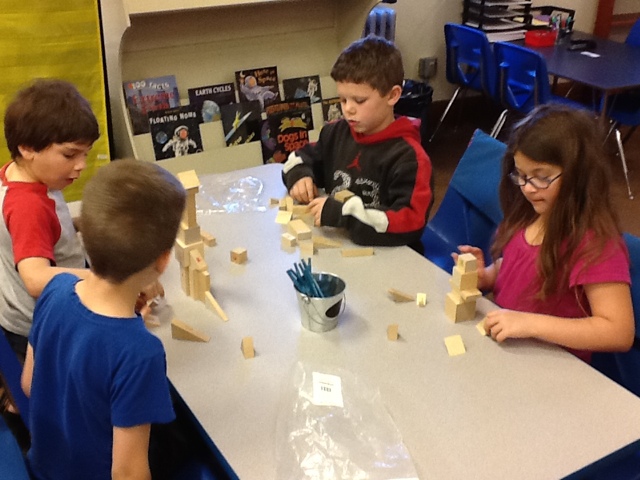
This week we have begun studying Geometry and Space! We wrote letters to martians explaining what a triangle is. We learned about the Solar System and galaxies using the Kids Discover Galaxies App and studied oi/oy words, taking pictures and writing complete sentences defining some of those words. We also worked hard to try and recreate the rocket our teacher made using one square of paper cut into four pieces. It was tricky!



Sunday, December 2, 2012
Exploring Bridges in Mathematics Apps
In our district our K-2 team uses the Bridges in Mathematics curriculum. A few nights ago I was browsing their website to see what was new. The Math Learning Center has been busy creating and sharing supplements to meet the new Common Core State Standards and I often find great resources on their website. I got really excited when I discovered that they had two new Apps...FOR FREE! I made sure to put their Geoboard and Number Rack Apps on our iPads first thing the next morning and encouraged my second graders to explore the Apps as they came in the door.
I LOVE what these second graders do with free exploration! Each time we do this I am amazed at how much, and how quickly, they discover and learn while "playing" with the Apps. After each exploration session we sit down together and share what we have learned about the App through our exploration. During this time students are teaching each other (and me!) what they discovered. This is also a great way to build their vocabulary. My students spent approximately 15 minutes exploring the Geoboard App. Here is a glimpse at what they created:
.JPG)
.JPG)
.JPG)
.JPG)
.JPG)
This week we will use the Number Rack App, which is also called a Rekenrek or calculating frame, to deepen our number sense and our understanding of addition and subtraction strategies. Bridges has a wonderful K-2 supplemental unit that you can use this App with as well. You can find it by clicking here.
I hope you have an iPad or two handy so you can try these out. They are fantastic tools!
I LOVE what these second graders do with free exploration! Each time we do this I am amazed at how much, and how quickly, they discover and learn while "playing" with the Apps. After each exploration session we sit down together and share what we have learned about the App through our exploration. During this time students are teaching each other (and me!) what they discovered. This is also a great way to build their vocabulary. My students spent approximately 15 minutes exploring the Geoboard App. Here is a glimpse at what they created:
This week we will use the Number Rack App, which is also called a Rekenrek or calculating frame, to deepen our number sense and our understanding of addition and subtraction strategies. Bridges has a wonderful K-2 supplemental unit that you can use this App with as well. You can find it by clicking here.
I hope you have an iPad or two handy so you can try these out. They are fantastic tools!
Tuesday, October 16, 2012
Let's Go Exploring!
Last year I decided to take a chance and do something a little bit out of my comfort zone...I relinquished some of my structured teaching time to my students so they could go exploring. From 8:00-8:10 students are encouraged to explore something in the classroom. Sometimes it is the materials for a science experiment, sometimes it is objects related to an upcoming lesson and sometimes it is technology.


When Explore Time was over we gathered for our morning meeting. I asked students to share something they had learned this morning while exploring their ipad. This is what they shared:
"I learned how to scroll down and get stamps on Doodle Buddies."
"I learned there were a lot of different apps on my ipad."
"I learned how to scroll in on Google Earth."
"I learned how to take pictures and videos using Photo Booth."
"I learned some new countries."
"I learned how to search for different places on Google Earth."
"I learned how to do stamping on Doodle Buddies."
"I learned how to make a slide show with video and pictures on Photo Booth."
Students were teaching each other and me how to do all of these things. We were learning and discovering together. I know we will be able to go further with our learning because I give my students this time. Don't be afraid...try it! You won't be disappointed.
Side Note: Many of my students arrive between 7:30 and 7:45 so most get more than 10 minutes to explore.
This morning it was our classroom ipads...
As students arrived this morning I let them know they could explore their ipad. I only gave one direction, "Explore the apps you have on your ipad and see what you can see?"
When Explore Time was over we gathered for our morning meeting. I asked students to share something they had learned this morning while exploring their ipad. This is what they shared:
"I learned how to scroll down and get stamps on Doodle Buddies."
"I learned there were a lot of different apps on my ipad."
"I learned how to scroll in on Google Earth."
"I learned how to take pictures and videos using Photo Booth."
"I learned some new countries."
"I learned how to search for different places on Google Earth."
"I learned how to do stamping on Doodle Buddies."
"I learned how to make a slide show with video and pictures on Photo Booth."
Students were teaching each other and me how to do all of these things. We were learning and discovering together. I know we will be able to go further with our learning because I give my students this time. Don't be afraid...try it! You won't be disappointed.
Side Note: Many of my students arrive between 7:30 and 7:45 so most get more than 10 minutes to explore.
Tuesday, August 14, 2012
Do you have and ipad or iphone?
This summer I have been exploring the virtual world via my new ipad. Did you know there is an "App"" for just about everything? "App" is an abbreviation for "application." An application is a virtual tool that can help you do all kinds of things. I read in the paper last week that in San Francisco there is an app you can purchase that allows you to schedule a time to have your car washed. Yes, your car washed! You just type in your address and the people who created this app come to you to wash your car! In this particular article the man using the app was having coffee in a coffee shop and the car washing company came there and washed his car right on the street. To me the whole thing sounded a little bit silly, but I don't live in a major metropolitan area with heavy traffic either...
What does this have to do with second graders (soon to be third graders!) you ask? Well, this summer I discovered the world of educational "apps" and there are tons of them that make learning fun and exciting. So, if you have an ipad or your parents have an iphone you should think about installing some of these applications. If you like video games, you will love these apps!
Phonics Tic-Tac-Toe Interactive
iWriteWords Lite
Stack the States Lite
Stack the Countries Lite
Count Money
Virtuoso (learn to play the piano!)
Doodle Buddy
Everyday Mathematics Monster Math
Sight Words by Little Spellers
Grammar Jammers
Learn Time Lite
Computer Carl
Apples in an Hour
Can't wait to hear what you think about these apps!
What does this have to do with second graders (soon to be third graders!) you ask? Well, this summer I discovered the world of educational "apps" and there are tons of them that make learning fun and exciting. So, if you have an ipad or your parents have an iphone you should think about installing some of these applications. If you like video games, you will love these apps!
Free ipad/iphone Apps
Phonics Tic-Tac-Toe Interactive
iWriteWords Lite
Stack the States Lite
Stack the Countries Lite
Count Money
Virtuoso (learn to play the piano!)
Doodle Buddy
Everyday Mathematics Monster Math
Sight Words by Little Spellers
Grammar Jammers
Learn Time Lite
Computer Carl
Apples in an Hour
Can't wait to hear what you think about these apps!
Monday, January 23, 2012
Today we made Glogster posters of our habitat research with our 7th grade tech buddies.
Rylee thought it was really fun! Tel enjoyed searching through all the fun graphic pictures on the Glogster website. Quinn liked listening to the music choices he could add to his Glog. Madison thought adding the pictures and background to her Glog was FANTASTIC! When we finish our posters we will share them with you. We can't wait!


Rylee thought it was really fun! Tel enjoyed searching through all the fun graphic pictures on the Glogster website. Quinn liked listening to the music choices he could add to his Glog. Madison thought adding the pictures and background to her Glog was FANTASTIC! When we finish our posters we will share them with you. We can't wait!


Have you ever made a digital poster using Glogster?

Subscribe to:
Posts (Atom)